TV (Samsung) Remote Control
- 4.5
- Rating
- 10.00M
- Installs
- Free
- Price
 Analysis by App-foxy
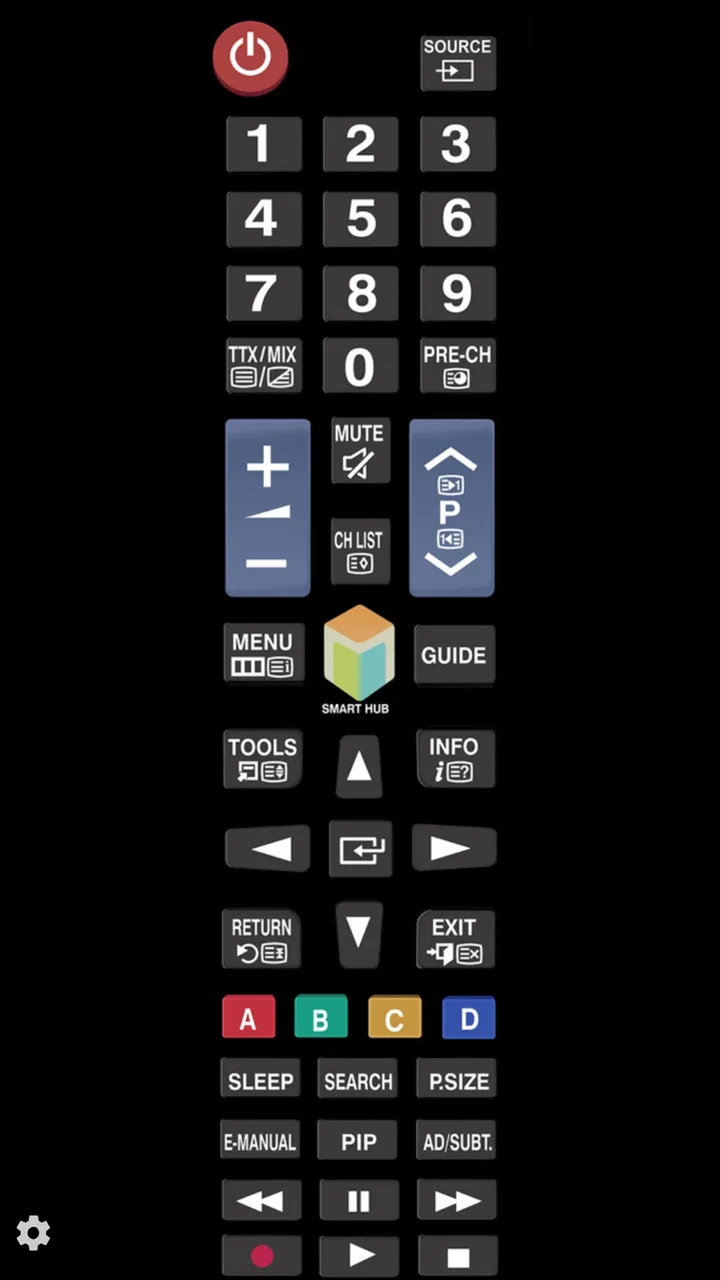
I installed TV (Samsung) Remote Control expecting a straightforward replacement for the physical remote, and that is exactly where this app makes sense. It is not a media editor despite sitting in the Video Players & Editors category; its creative value is more practical. It helps me start, manage, and finish a viewing session when the original controller is misplaced, out of reach, or simply inconvenient. For a Samsung TV owner, that small change can make the whole process of choosing and watching content feel less interrupted.
The app is free, aimed at Everyone, and developed by npe. It has been available since April 24, 2014, and its current version is 2.10.2. With an average rating of 4.5 from around 185 thousand ratings and more than 10 million installs, it is clearly used as a dependable utility rather than a novelty. I would describe it as a focused tool: useful when your television and phone cooperate, but not a universal answer for every home entertainment setup.
From finding the remote to starting a viewing session
I start with the small but useful change this app offers: instead of searching for a misplaced remote, I can try to begin the viewing session from my phone. That makes it most valuable as a practical backup, especially when the TV is ready but its controller is not. Before relying on it for a whole evening, I’d test the connection and identify the few controls I use most, then consider how that simple workflow holds up in everyday use.
You May Also Like

 Blood Strike: 2.5 Anniversary
Blood Strike’s Loadouts Turn Every Drop Into a Tactical Gamble
A close look at Blood Strike’s custom loadouts: how fast access to signature weapons reshapes its battle royale rhythm, rewards preparation, and narrows the gap between fights.

 Pandora - Music & Podcasts
Pandora’s Music Is Easy to Start, but Harder to Recover
Pandora’s strength is its low-effort path from a seed to a station. Its weak spot is how much confidence it asks you to place in connection, setup, and quiet recovery.

 8 Ball Pool
 Is Built on Rivalries, Rematches, and Routine
A close look at the rivalries, rematches, shared routines, and unanswered safety questions that turn a quick pool match into a persistent mobile community.

 Samsung Music
’s Quiet Strength Is Playing What You Already Own
Its reach comes less from spectacle than from dependable access to a personal library. That simplicity is both the app’s strongest retention engine and its ceiling.

 AccuWeather: Weather Radar
AccuWeather Review: A Quick, Clear Forecast for Everyday Decisions
For everyday plans, the best forecast is the one you can understand quickly. AccuWeather makes rain timing, radar, and local conditions easy to act on, with a few trade-offs.

 Hill Climb Racing
Why Hill Climb Racing Still Turns Crashes Into One More Run
A tiny car, a bumpy hill and one more upgrade: Hill Climb Racing keeps resurfacing because its simple chaos makes every near-miss feel personal.
More From Our News Desk



The best creative starting point is removing the first obstacle
When I think about a “creative workflow” for television, the starting point is usually not making a video. It is deciding what I want to watch and getting the screen ready without wasting time looking for hardware. That is where this remote-control app earns its place. I can keep my phone nearby and use it as the starting control instead of searching between sofa cushions or walking to another room.
This is especially handy in a shared living room. If somebody has left the physical remote beside the television, I can still begin from my phone without interrupting them. It also suits a bedroom television, a guest room, or any setup where the handset is regularly moved. The app’s appeal is not that it transforms the TV; it reduces a very ordinary point of friction.
I found the simple approach more valuable than an overloaded remote application would have been. A phone already has a screen, touch controls, and a place where I am likely to keep it. Turning that device into a Samsung TV controller makes sense when I need basic interaction quickly. The trade-off is that the app’s usefulness depends heavily on the television being compatible and reachable through the connection method it expects. It is not something I would install assuming it can control every brand or every display.
What I would check before relying on it
The most important preparation is practical rather than technical: make sure the phone and television are ready to communicate before you need the app in an urgent moment. I would test it while the physical remote is still available. That gives me a chance to see whether the TV responds, whether the controls feel comfortable, and whether my home network or television setup creates any delay.
This quick test also answers the question many people have before downloading: will it work with my particular Samsung TV? The app is specifically presented as a Samsung TV remote, but Samsung televisions do not all behave identically across generations and configurations. I would not assume that the label guarantees identical results on every model. Testing first is the sensible approach, especially if this is meant to be a backup rather than a casual experiment.
Android compatibility is broad enough for many older phones, since the app requires Android 6.0 or later. That is useful if you have a spare handset dedicated to the living room. I would still avoid installing it on a phone that is too old or unreliable for everyday use, because a remote app is only helpful when the phone wakes quickly and responds consistently.
A realistic evening use case
Imagine I finish dinner and want to continue a film, but the physical remote is upstairs. My phone is already in my hand, so I open the app, connect to the television, and use it to wake or operate the set if the setup allows it. I can then move through the viewing process without turning the search for a remote into a separate chore.
That scenario sounds minor, but it is the kind of repeated inconvenience that makes a utility worthwhile. The app is also useful when I want to lower the volume quietly, pause a program while someone else is sleeping, or make a quick adjustment without reaching across a coffee table. I would not call it a replacement for every remote-related task until I had tested all the controls I personally use, but it is a convenient first response to the missing-controller problem.
How the basic control experience feels
The interface is built around the idea that a remote should be fast to understand. I did not need a long learning period to grasp the purpose of the app. That matters because a television controller is usually opened for a quick action, not for browsing a complex dashboard.
Touch controls do change the experience compared with physical buttons. A real remote gives me tactile feedback, so I can often press buttons without looking down. With a phone, I need to watch the screen more carefully, particularly when I am moving between different functions. This is a genuine limitation for people who operate the TV in a dark room or who prefer to control it by feel.
There is also the question of the phone itself. If the battery is nearly empty, the device is being used for a call, or notifications cover the screen, the physical remote remains more convenient. I see this app as a strong backup and a useful everyday alternative, not as proof that a dedicated controller is obsolete.
Making the viewing process smoother
Once connected, the app becomes part of the “making” stage of a viewing session: choosing a source, adjusting the screen, and getting content ready to play. Its value is strongest when I want to make several small changes from one place instead of picking up the remote, putting it down, and searching again.
For people who manage presentations, demonstrations, or home videos on a Samsung TV, that can be helpful. I can stand a little farther from the screen while preparing what viewers will see, rather than staying beside the television. I would still rehearse the controls before presenting anything important, because a phone-based remote introduces the possibility of a connection delay or an accidental touch.
The app is not a tool for editing footage, adding titles, trimming clips, or publishing a finished project. Its role comes before playback and during delivery. If my goal is to create content, I would use a separate editor; if my goal is to put that content on a Samsung television and control the presentation, this app can be the more relevant companion.
Iteration: where a phone remote can help
Repeated viewing and presentation tasks are where I noticed the most practical benefit. When I am checking a video, I often need to pause, replay, adjust the volume, or return to another item several times. Having the controller on my phone keeps those small revisions moving. I can review a clip, make a change in the source file on another device, and continue controlling the TV without hunting for a separate handset.
That workflow is particularly useful for a family slideshow or a small home presentation. I can prepare the material elsewhere, use the Samsung television as the display, and keep the remote function in my hand while I observe the result from across the room. The app does not improve the video itself, but it makes the review loop less awkward.
One non-obvious advantage is that the phone can remain with the person directing the session. In a shared room, the person choosing what happens next does not need to sit beside the television. This is a modest form of separation between the screen and the controller, but it can make demonstrations, teaching, or group viewing feel more organized.
Small habits that improve reliability
I recommend opening the app before everyone is waiting for the next video. Give it a moment to connect, then test a simple command. If the television does not respond, troubleshoot calmly while the physical remote is still available instead of discovering the problem during a presentation.
I would also keep the phone’s screen clean and avoid holding it in a way that makes accidental touches likely. Touch remotes are more sensitive than button-based ones. If I am passing control to another person, I explain the essential actions first rather than handing over the phone and expecting the layout to be self-explanatory.
For a spare phone, I would keep the device charged and place it near the usual viewing area. That turns the app from an emergency download into a dependable household tool. The app itself is free, but the real cost is the small amount of setup time needed to confirm that the television and phone work well together.
Iteration is also where the limitations become visible
The same simplicity that makes the app approachable can feel restrictive if I expect the depth of a modern smart-TV companion. A physical Samsung remote may offer buttons or shortcuts that are not equally comfortable on a touchscreen. A manufacturer’s official control solution may also be a better choice for people who want a broad ecosystem experience, deeper device integration, or one place for several Samsung products.
On the other hand, an official solution can feel heavier than I want for a single task. If all I need is a basic remote for one Samsung television, a focused app may be easier to keep around. This is the central trade-off: choose TV (Samsung) Remote Control for directness, but look elsewhere if your home depends on advanced smart-home routines or a large collection of devices.
I would also skip it if I need a remote that works independently of the phone’s condition or network environment. A dedicated physical remote is still the safer option for children, guests, or situations where nobody wants to hand over a personal phone. Likewise, people with a non-Samsung television should choose a controller designed for that brand rather than hoping this app will act as a universal remote.
Export and handoff: getting content ready for other people
The app does not export a video file or hand a finished project to another platform. Its handoff role is physical and immediate: I prepare content on the device where it lives, display it on the Samsung TV, and use the phone to guide playback for the audience. That distinction is important. Someone looking for a complete create-edit-publish workflow will need other software for the creative stages.
Where it helps is the final presentation. I can keep control while standing near the viewers, pause when somebody asks a question, and resume without walking to the television. For a family recording, an informal presentation, or a quick demonstration, that is enough to make the handoff feel more polished.
Before relying on it in front of others, I would prepare a fallback. Keep the physical remote nearby, confirm the correct input, and make sure the phone is not about to lock or lose power. These are not glamorous steps, but they separate a smooth presentation from an awkward pause while everybody waits for a controller to reconnect.
How it compares with the usual alternatives
The usual alternative is the original physical remote, and it remains better for tactile control, instant access, and independence from a phone. If I watch television every day and the remote is always where it belongs, I may not need this app at all. Its advantage appears when the physical controller is missing, shared, damaged, or inconveniently located.
Another option is a general universal-remote app. That may be preferable in a home with televisions from different manufacturers, but broader compatibility often brings a busier setup and a less focused experience. This app’s Samsung-specific purpose is a strength when it matches the television and a weakness when the household is mixed.
A manufacturer-oriented smart-TV companion can be the better choice for people who want richer device management. I would choose that route if I needed more than straightforward remote control. For a single Samsung TV and a user who values a small, uncomplicated utility, npe’s app is easier to justify.
Who should use it and who should pass
I think it is a good fit for Samsung TV owners who frequently misplace the remote, want a backup on an older Android phone, or need to control playback while standing away from the screen. It also suits households where one person prepares content and another person watches, because the phone can stay with the person managing the session.
I would be more cautious about recommending it to someone who expects universal compatibility, tactile buttons, advanced smart-home control, or a full content-creation suite. It is not an editor, a publishing platform, or a replacement for every feature found on a dedicated Samsung controller. Those expectations would lead to disappointment.
The age rating of Everyone makes sense for a basic household utility, and the free price removes the main barrier to trying it. Still, free does not mean it is automatically the right tool. The decisive test is whether it connects reliably to your television and whether the touch layout feels comfortable for the actions you perform most often.
My verdict after using it as a viewing companion
TV (Samsung) Remote Control works best when I treat it as a practical bridge between preparing content and showing it on a Samsung television. It does not add creative effects or replace an editor, but it can make the final control stage less frustrating. The app is fast to understand, free to try, and focused enough that I would keep it installed if my television responded reliably.
My recommendation is conditional but positive: test it with your specific Samsung TV, keep the physical remote as a fallback, and use it for the situations where a phone is genuinely more convenient. The strong rating and large install base suggest that many people find this focused purpose worthwhile, but my own experience says its value comes from the fit between the app, the television, and your habits.
For me, the deciding question is simple: do I want a dependable backup and a handy way to manage playback from my phone? If yes, this is a sensible download. If I need a universal controller, tactile certainty, or a complete creative workflow from editing through publishing, I would choose a different solution and let this app remain what it does best: a straightforward Samsung TV remote in my pocket.
FAQs for TV (Samsung) Remote Control
01What features does the TV (Samsung) Remote Control app offer?
The TV (Samsung) Remote Control app provides a wide range of features including channel navigation, volume adjustment, and input source selection. It also supports voice commands and offers a touchpad for smart TV interaction. Additionally, it allows users to customize their remote layout for a more personalized experience.
02Is the TV (Samsung) Remote Control app compatible with all Samsung TV models?
The app is compatible with a majority of Samsung smart TVs, especially those released after 2014. However, it's important to check the specific model compatibility on the app’s download page to ensure it will work seamlessly with your particular device model.
03Does the app require any special permissions or settings to function?
Yes, the app requires access to your device’s Wi-Fi to connect to your Samsung TV. Additionally, it may request permission to use your microphone for voice command features. Ensure your TV is connected to the same Wi-Fi network as your device for optimal performance.
04Are there any in-app purchases or subscription fees in the TV (Samsung) Remote Control app?
While the basic functionalities are typically free, the app may offer in-app purchases for premium features such as advanced remote layouts, ad-free experience, or additional customization options. Always review the app store listing for detailed information on pricing and subscriptions.
05How user-friendly is the TV (Samsung) Remote Control app for non-tech-savvy users?
The app is designed with an intuitive interface that makes it accessible to users of all technical backgrounds. It features straightforward navigation and setup instructions, ensuring that even those less familiar with technology can easily use it to control their Samsung TV. Additionally, the app often includes a help section or tutorial for new users.
Pros
- Easy setup and intuitive interface.
- Compatible with most Samsung models.
- Supports voice commands efficiently.
- Customizable button layout.
- Low battery consumption.
Cons
- Limited features on older TV models.
- Requires stable Wi-Fi connection.
- Ads can be intrusive at times.
- No support for other TV brands.
- Some features require in-app purchases.

TV (Samsung) Remote Control
Gallery